Torchform
- Language
- Rust
- UI Toolkit
- Slint
- Compositor
- Smithay (Wayland)
- Displays
- Dual DSI (1440p + 480p)
- Input
- Cirque SPI trackpad, USB HID gamepad, uinput
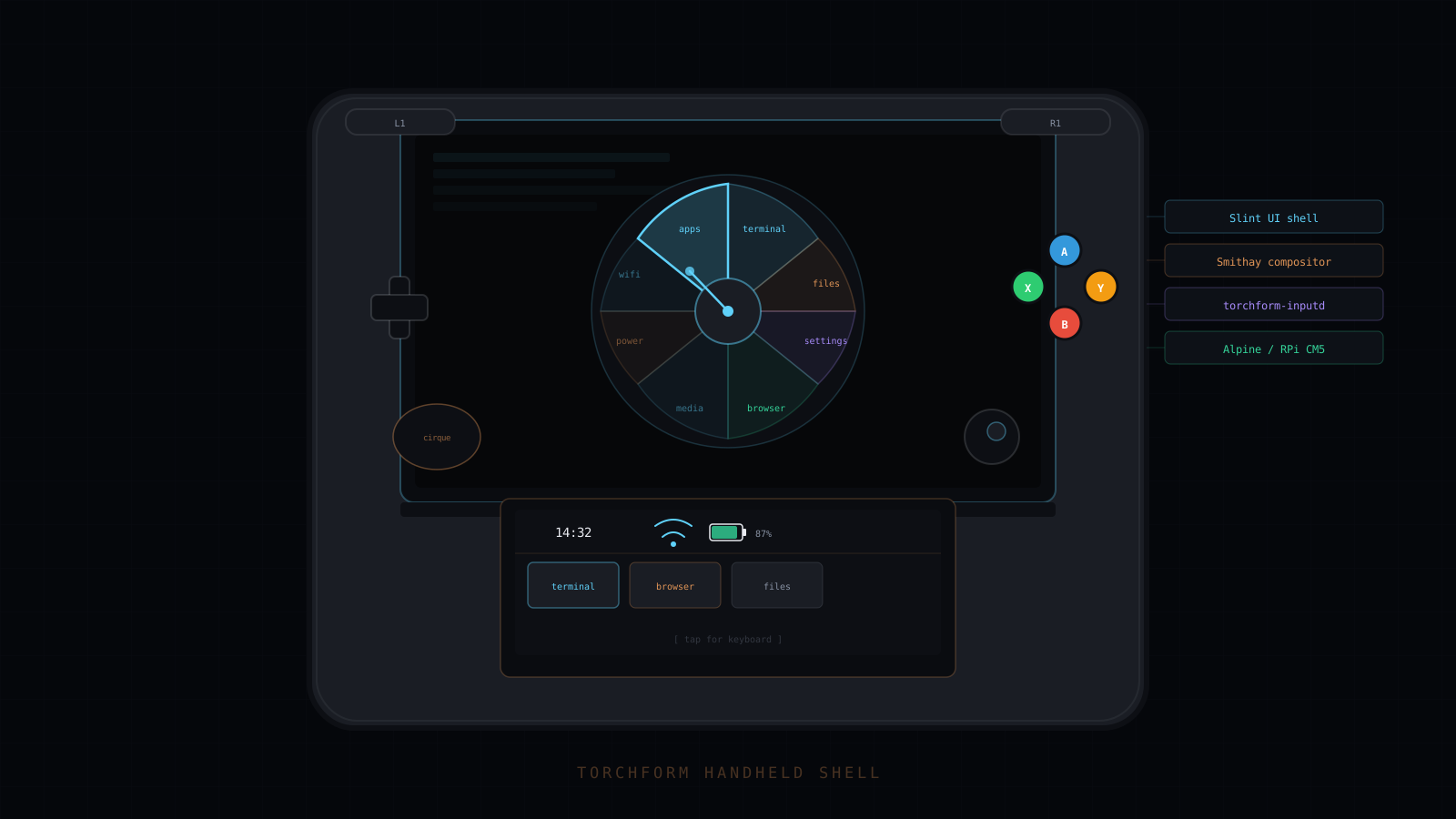
- Smithay-based Wayland compositor managing two independent DSI outputs: upper display (1440p) for apps and overlays, lower (480p) for status and virtual keyboard
- Slint UI shell with a radial menu, command palette, and app switcher as composable overlay components, compiled from .slint source at build time
- Input daemon (torchform-inputd) reads a Cirque SPI trackpad via spidev and a USB HID gamepad via gilrs, emits a uinput virtual device, and publishes decoded ShellAction variants over a Unix socket
- Keybind abstraction layer: RawInput to ShellAction mapping is TOML-driven with built-in defaults, so no button names appear in shell logic
- 11-crate workspace with strict dependency isolation: shared libs (torchform-actions, torchform-config) carry zero Slint dependency so input and config logic compile without the UI stack
- Dual-screen emulator crate (minerva-emulator) renders both displays inside a single hardware-frame window for desktop development without physical hardware
Torchform is the desktop environment for Project Minerva, a custom handheld with two DSI displays and a gamepad-style controller. The upper display (1440p) runs apps and shell overlays; the lower (480p) carries system status and a virtual keyboard. Everything is in Rust, targeting Alpine Linux on a Raspberry Pi CM5.
Compositor
The Wayland compositor is built on Smithay, using the udev backend for direct DRM/KMS output to both DSI panels in production and the winit backend for running nested inside an X11 or Wayland session during development. Each DSI output is a separate TorchOutput, with XDG tiling managing surface placement per output. Seat management goes through libseat with no logind dependency.
Shell UI
The shell is a Slint process that connects to the compositor as a Wayland client. UI is authored in .slint declarative markup and compiled at build time by slint_build; the Rust binary drives state machines for each overlay component. The radial menu takes analog stick input to select an action arc; the command palette lists registered app and system commands in a scrollable overlay; the app switcher shows live workspace tiles. All three are composable and can be visible simultaneously.
Shared UI panels (Settings, Files) are compiled once into the shell and also linked into standalone Slint app binaries (torchform-settings, torchform-files), so the in-shell stubs and their standalone counterparts share the same .slint source.
Input Daemon
torchform-inputd is a separate process that owns all physical input. It opens /dev/spidev0.0 for the Cirque capacitive SPI trackpad (with a kernel evdev fallback), scans /dev/input/event* for the USB HID gamepad via gilrs, and creates a uinput virtual gamepad. A ChordDetector translates button combinations and D-pad holds into low-level Action variants; InputMap (backed by ~/.config/torchform/keybinds.toml) maps those to ShellAction enum variants, serialized as JSON over a Unix socket at /run/torchform/inputd.sock. The shell reads only ShellAction. No raw button names appear in shell logic.
Crate Architecture
The workspace is 11 crates with deliberate dependency isolation. torchform-actions (ShellAction enum, InputMap) and torchform-config (TorchformConfig, settings schema) are shared libs with no Slint dependency. They compile in seconds and can be pulled into tools or tests without the UI stack. The compositor crates (torchform-compositor, torchform-inputd) also carry no Slint dependency. The Slint build step is isolated to the shell and standalone app crates.
Development Emulator
minerva-emulator renders both displays inside a single desktop window styled as a hardware frame, similar to a DS emulator. Keyboard mappings simulate the gamepad and stick, all ShellAction variants are reachable from a keyboard, and --demo flags start the shell with a specific overlay open. The entire shell is developed and tested on a desktop without physical hardware or a compositor.